Before you can be added to our waitlist for an autism assessment, we ask that you complete some important pre-assessment forms.
These forms are essential in providing our clinicians with the information they need to understand your unique situation and help us reach an accurate diagnostic outcome.
We understand that this process might feel a bit daunting, so we've created a step-by-step guide to help you navigate it.
Below, you'll find everything you need to know to access, complete, and submit your forms through your ProblemShared client dashboard.
Accessing, completing, and submitting your forms
1. Sign in.
- Start by signing into your ProblemShared client dashboard.
2. Get started.
- Click the “Start” button to go to the pre-assessment forms page.

3. Upload I.D.
- Next, you need to upload two documents: proof of address and photographic identification.
- Some examples of acceptable documents are featured in drop-down menus.

4. Provide informant details.
- An informant is a person nominated to provide further information to our clinicians that will contribute to your assessment.
- Please provide the details of your informant in the ‘Informant details’ section.
5. Completing your forms.
- Click 'Complete form' to complete the Adult Autism Self Report Form and the Adult Client Background Form directly in your browser.
- Your progress is saved automatically as you go.
- You can return to complete the form at any time using the same link.
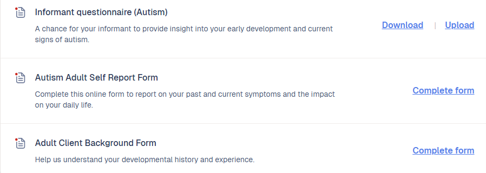
6. For PDF forms.
- Download the Informant Questionnaire (Autism) form by pressing the 'Download' button, which will open the form in a new tab.
- On the menu bar at the top of your screen, select File > Save As to download a PDF copy of the form onto your computer.
- You'll need to send the form to your nominated informant so they can fill it out using Adobe Acrobat.
- When they've completed the questionnaire, they'll need to send it back to you.
- Upload the completed form back into your Client Dashboard so we can access them. Click the 'Upload' button next to the correct form, and select the saved file.


More information on specific forms
1. Pre-Assessment Questionnaires
The Adult Autism Self Report Form and the Adult Client Background Form should be completed by you, as the person seeking an assessment.
These forms give you the opportunity to report on your developmental history and your current experiences across different settings, such as at work or within your relationships.
To complete the forms, work through each section, answering the questions with relevant examples and details where possible.
2. Informant Questionnaire
Your Informant Questionnaire should be completed by your nominated informant. You’ll need to download the form and send it to them.
When they’ve completed the questionnaire, they’ll need to send it back to you so that you can upload it to client dashboard.
If more than one person is suitable to contribute to your assessment, you can download and send out up to three copies of the questionnaire. Suitable candidates include:
- A parent or carer
- A partner
- A close friend
- A sibling
Ideally, both a caregiver and a partner or close friend would complete an informant questionnaire.
You can only upload 1 informant form to your client dashboard. If you have additional informant forms to share with us, please email them to help@problemshared.net so they can be uploaded.
Additional tips
- Make sure you’ve got the right tech. Ensure that you have access to a suitable device for completing these forms, such as a laptop or tablet. If you do not have access to a suitable device, it may be possible to fill them out by borrowing a computer from someone you know.
- Take your time. There is a lot of information in the forms, and we appreciate that this could seem overwhelming. Consider breaking each form down into smaller sections, and use bullet points instead of long paragraphs if that’s easier.
- Password reset guidance. If you reset the password to your client dashboard but can’t find the email in your inbox, remember to check your spam folder.
- Double-check your forms. You can view each uploaded form on your client dashboard to make sure each one is correct.
Once you have successfully uploaded your completed pre-assessment forms, you will be deemed ‘assessment ready’ and you will be moved onto our waitlist for an autism assessment.
If you have any questions or need further assistance while completing your pre-assessment forms, please don’t hesitate to reach out to a member of our team at help@problemshared.net or by calling 020 3835 4727.